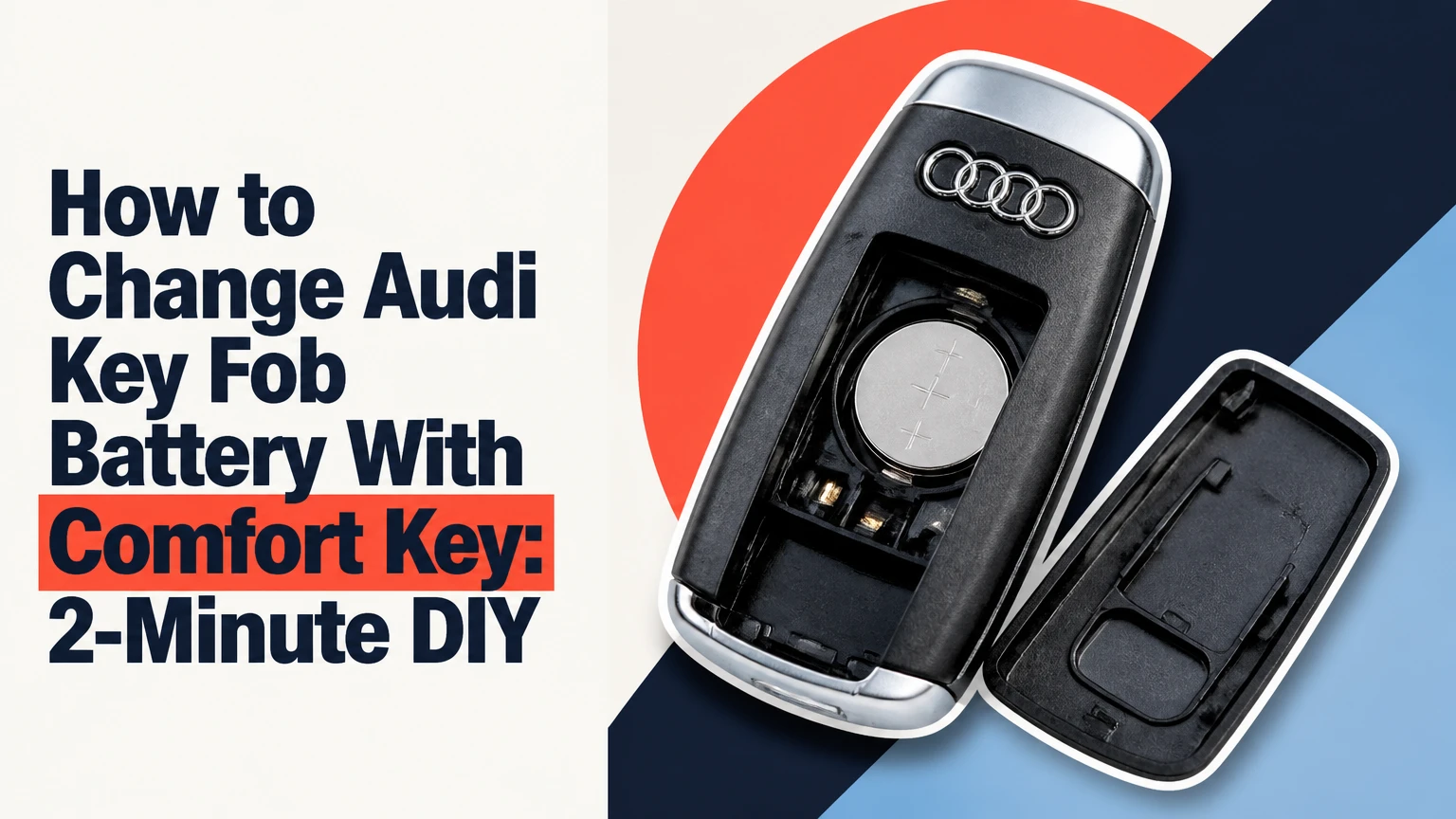
To change an Audi key fob battery with Comfort Key, identify the fob housing, remove the mechanical key or rear cover, install the specified lithium coin cell with the marked polarity, and close the housing until it clicks. Most replacements take 2-5 minutes and do not require reprogramming, provided the key was functioning before the battery failed.
Key Facts at a Glance
Most Audi Comfort Keys use a 3-volt CR2032 lithium coin cell, but the installed battery and housing marking take priority.
A normal battery replacement does not erase the Audi key’s pairing or immobilizer authorization.
Slide-out tray fobs and snap-off rear-cover fobs open differently, so forcing the wrong seam can break retaining clips.
Battery polarity is housing-specific. Verify the plus symbol inside the tray instead of assuming the positive side always faces up or down.
A dead remote battery usually does not prevent the engine from starting because Audi provides a backup key-recognition procedure.
Typical DIY cost is $2-$6 for a quality battery, compared with roughly $25-$75 at a dealership or independent key specialist.
What Is an Audi Comfort Key?
An Audi Comfort Key is Audi’s passive-entry and push-button-start system. The vehicle can unlock when the driver touches the appropriate door-handle sensor, and the engine can start while the key remains in a pocket or bag.
The Comfort Key is different from a conventional remote because the vehicle actively detects the fob when the driver approaches or touches the handle. Audi uses low-frequency signals from vehicle antennas and a higher-frequency response from the key to authenticate access. The remote buttons still operate locking, unlocking, luggage-compartment release, and panic functions.
That convenience increases battery demand. A conventional remote may spend more time asleep, while a passive-entry fob periodically responds to vehicle signals. Battery life also falls faster when the key is stored close to the parked Audi, exposed to extreme cold, or repeatedly pressed inside a crowded pocket.
Audi owner manuals identify the exact battery and replacement procedure for each key design. The manual for the individual vehicle remains authoritative because Audi changed housings, retaining mechanisms, and backup-reader locations across model generations.
Which Audi Key Fob Design Do You Have?
The quickest identification method is to look at how the mechanical emergency key leaves the fob and where the battery cover separates. Audi has used several related smart-key housings, and model-year names alone cannot guarantee the opening method.
| Fob design | Visual identifier | Common Audi applications | Typical battery | Opening method |
|---|---|---|---|---|
| Slide-out tray | Silver release and removable key reveal a narrow tray | A4, A5, A6, A7, Q5, Q7, Q8, often 2017 onward | CR2032 | Squeeze side tabs and pull tray |
| Snap-off rear cover | Mechanical key cavity contains a release point for the back shell | A3, Q3, TT, R8, several current variants | CR2032 | Release internal catch and lift cover |
| Clamshell or flip key | Housing divides along a central seam | Older A3, A4, A6, Q3, Q5 variants | CR2032 or CR2025 | Separate shell at the designed seam |
| Dealer-specific replacement | Audi logo and buttons may match, but internal carrier differs | Replacement keys from different production periods | Label-dependent | Follow the carrier or manual marking |
A 2017 Audi Q5 and a 2018 Audi A3 may both use Comfort Key technology while requiring different opening techniques. The fob’s physical construction is more useful than the badge on the vehicle.
How Do You Confirm the Correct Battery?
Confirm the battery by reading the number printed on the old cell, the inside of the carrier, or the Audi owner’s manual. CR2032 is common, but a CR2025 is not an interchangeable upgrade because both cells measure 20 millimeters across while the CR2025 is 0.7 millimeters thinner.
| Battery | Nominal voltage | Diameter | Thickness | Practical implication |
|---|---|---|---|---|
| CR2032 | 3 volts | 20 mm | 3.2 mm | Common Audi Comfort Key specification |
| CR2025 | 3 volts | 20 mm | 2.5 mm | May fit loosely in a CR2032 carrier |
| CR2016 | 3 volts | 20 mm | 1.6 mm | Usually too thin for reliable retention |
| Two stacked cells | 6 volts | 20 mm | 3.2 mm combined | Do not install unless the fob explicitly requires it |
Panasonic and other battery manufacturers publish these dimensional differences in their CR-series datasheets. The thinner CR2025 can sometimes make the buttons work temporarily, but reduced spring pressure may create intermittent locking, unlocking, or passive-entry operation.
Buy a fresh, reputable 3-volt lithium cell in sealed packaging. Do not use a visibly corroded battery, a cell with damaged wrapping, or one that has been loose in a drawer.
How to Change an Audi Key Fob Battery With Comfort Key
The replacement process normally requires one battery and no special tool; Audi A3 key battery replacement covers smart-key and flip-key opening differences. Work over a table, keep the old battery away from children and pets, and photograph the installed cell before removing it if the polarity marking is difficult to see.
Before You Start
| Requirement | Typical specification | Why it matters |
|---|---|---|
| Replacement cell | One CR2032 or manual-specified cell | Prevents loose fit and incorrect voltage |
| Working time | 2-5 minutes | Includes identification and function check |
| Tools | Mechanical key, fingernail, or small plastic pick | Reduces scratches and clip damage |
| Difficulty | Low, moderate for clamshell housings | Retaining clips can break under excessive force |
| Preparation | Dry table and clean hands | Prevents contamination and dropped parts |
Avoid a large screwdriver unless the housing specifically provides a metal-tool slot. A plastic trim pick or the edge of the mechanical key gives better control around painted or gloss-black surfaces.
Step 1: Remove the Mechanical Key
Press the silver release button or sliding catch, then pull the mechanical key straight out of the fob. Put the key beside the housing rather than setting it under the vehicle or in a pocket where it can be misplaced.
Success checkpoint: The emergency key leaves the fob without twisting, and the exposed cavity or rear-cover release becomes visible.
Common mistake: Pulling on the key ring instead of the key blade can strain the release mechanism without exposing the battery carrier.
Step 2: Open a Slide-Out Tray Fob
Press the two retaining tabs on the sides of the exposed cavity toward each other. While holding both tabs, pull the battery carrier backward from the fob body.
Some trays resist because a sealing ring or friction fit holds the carrier tightly. Insert the mechanical key into the designated center slot only far enough to lever the carrier outward; do not pry against the thin outer shell.
Success checkpoint: The entire battery carrier comes out as a separate plastic piece, leaving the fob body and buttons undisturbed.
Common mistake: Pulling the tray without squeezing both tabs can round the tabs and prevent the carrier from locking later.
Step 3: Open a Snap-Off Rear-Cover Fob
With the mechanical key removed, inspect the cavity for the internal catch. Insert the key blade or a small flat tool into the marked release point, then push or twist gently in the direction indicated by the housing.
Lift the rear cover only after the clips release. If the cover flexes sharply, stop and check for a second retaining point rather than increasing force.
Success checkpoint: The rear shell separates cleanly, with no white stress marks, fractured tabs, or loose button membrane.
Common mistake: Starting at the outside seam can chip the plastic because the intended release point is usually inside the mechanical-key cavity.
Step 4: Record the Battery Orientation
Look for a molded plus sign, minus sign, or battery diagram before removing the old cell. The positive face is the side printed with a “+” symbol or the battery’s lettering, but the direction it faces differs among Audi fob carriers.
Some slide-out trays place the positive side downward into the carrier. Many snap-off covers place the positive side upward toward the rear cover. Those patterns are useful clues, not substitutes for the marking inside the actual fob.
Success checkpoint: You can state which side of the replacement cell faces the contact before removing the old battery.
Common mistake: Copying an internet video for a different Audi generation can reverse polarity and leave the remote completely inactive.
Step 5: Install the New Coin Cell
Remove the old battery with a fingernail or plastic pick. Avoid bending the metal spring contact, and hold the new CR2032 by its edge rather than rubbing both faces with your fingers.
If the replacement battery has a clear protective film, remove it before installation. Press the cell under the fixed retaining lip first, then down beneath the spring contact, using the same orientation as the original.
Success checkpoint: The battery lies flat, the contact spring presses against it, and the cell cannot rattle when the carrier is gently moved.
Common mistake: Sliding the battery over the spring contact can flatten the spring and create an intermittent connection.
Step 6: Reassemble and Test the Fob
Push the tray into the fob body until it clicks, or align the rear-cover tabs before pressing the shell closed. Reinsert the mechanical key and test lock, unlock, luggage-compartment release, and panic functions from several feet away.
Test passive entry separately by locking the Audi, walking away with the key, then touching the handle after the vehicle has locked. A button test alone does not confirm Comfort Key proximity detection.
Success checkpoint: The buttons operate immediately and the vehicle recognizes the key without a synchronization procedure.
Common mistake: Testing only at arm’s length can hide a weak battery, poor contact, or reduced antenna range.
Does an Audi Comfort Key Need Reprogramming After Battery Replacement?
An Audi Comfort Key normally does not need reprogramming after a routine battery change. The battery powers the transmitter and passive-entry circuitry, while the key’s authorization data remains stored in the fob and vehicle.
A brief loss of power does not normally delete the immobilizer identity. If the key worked before the cell was removed and stops working afterward, check polarity, protective film, contact pressure, and battery condition before seeking coding.
Some vehicles may require a simple synchronization sequence after a prolonged dead battery or repeated remote-button presses. That procedure varies by model and owner’s manual. Synchronization is different from immobilizer programming, which requires specialist equipment and security authorization.
What Are the Cost and Lifespan Differences?
A DIY Audi key battery replacement typically costs $2-$6 and takes 2-5 minutes. A dealer or automotive locksmith commonly charges about $25-$75 for a battery service, although local labor rates, key inspection, and vehicle access can move the price outside that range.
| Replacement route | Typical cost | Typical time | Best use case | Main limitation |
|---|---|---|---|---|
| DIY CR2032 replacement | $2-$6 | 2-5 minutes | Intact fob with visible carrier | Owner assumes clip risk |
| Independent key specialist | $10-$35 | 5-20 minutes | Damaged cover or uncertain housing | Availability varies by area |
| Audi dealership | $25-$75 | 15-45 minutes | Battery plus inspection | Higher labor and scheduling cost |
| New programmed key | $200-$600 or more | Same day to several days | Lost, damaged, or nonresponsive key | Battery replacement will not solve coding faults |
A quality Comfort Key battery typically lasts 12-24 months. Passive-entry use, cold weather, a key stored beside the vehicle, accidental button presses, and a second key left inside the cabin can shorten that interval.
The U.S. Consumer Product Safety Commission warns, “Keep coin batteries out of sight and out of reach of children.” Treat a removed CR2032 as hazardous household waste where local rules require it, and tape both faces before disposal to reduce accidental contact.
Why Is the New Audi Key Battery Not Working?
A replacement battery that does not work is usually installed backward, covered by retail film, seated above the retaining lip, or unable to reach a flattened contact. A correct cell in a damaged or water-contaminated fob can also fail immediately.
| Symptom after replacement | Likely cause | First corrective action | Escalation point |
|---|---|---|---|
| No buttons work | Reversed polarity or protective film | Recheck plus marking and remove film | Inspect circuit board |
| Buttons work only when squeezed | Loose CR2025 or bent contact | Install specified cell and restore contact pressure carefully | Replace carrier |
| Remote range is very short | Weak cell, poor contact, or interference | Fit a fresh name-brand cell and clean contact | Test second key |
| Passive entry fails, buttons work | Vehicle antenna or Comfort Key fault | Test spare key and vehicle-side locking | Diagnose vehicle module |
| Cover will not close | Incorrect cell thickness or displaced gasket | Confirm CR2032/CR2025 specification | Replace damaged housing |
| Key worked after opening, then stopped | Broken clip or spring contact | Reinspect carrier and retaining points | Locksmith or dealer inspection |
Use a multimeter only if you know how to test coin cells without shorting them. A new CR2032 should measure near its nominal 3 volts with no load, but open-circuit voltage alone does not prove the cell can deliver current under operation.
Do not scrape the circuit board, spray contact cleaner into the fob, or bend a metal contact repeatedly. One careful adjustment may restore pressure; repeated bending can fracture the contact from its circuit-board connection.
Can You Start an Audi With a Dead Comfort-Key Battery?
A dead Comfort Key battery usually does not prevent the Audi engine from starting. Audi vehicles include a backup recognition method, but the exact reader location differs by model and year, so the owner’s manual takes priority over a generic placement instruction.
Common procedures include holding the back or designated end of the key against a marked steering-column area, placing the key in a center-console or cupholder reader, and pressing the Start/Stop button while the brake pedal is depressed. The vehicle may also require the mechanical key to unlock the driver’s door manually.
| Situation | Likely action | Important condition |
|---|---|---|
| Remote buttons dead | Use the mechanical key to unlock the door | Alarm behavior varies by vehicle |
| Key not detected at Start | Place fob at marked backup reader | Location differs by model year |
| Battery completely missing | Use backup reader if vehicle supports it | Passive identification may still function |
| Vehicle battery discharged | Charge or jump-start vehicle battery | A new fob cell cannot power the car |
| Key still not recognized | Try the spare key | May indicate immobilizer or antenna fault |
A dead fob battery and a dead vehicle battery create different symptoms. If neither key operates the locks or starts the vehicle, test the Audi’s 12-volt battery before replacing multiple coin cells.
Which Practices Prevent Repeat Failures?
Store the active key away from the parked Audi when practical, especially if the vehicle remains outside for extended periods. A Faraday pouch can reduce passive wireless communication and relay-attack exposure, but the pouch must be tested because damaged or low-quality conductive fabric may attenuate signals inconsistently.
Keep a sealed spare CR2032 at home or in a dry travel kit, not loose beside metal objects. Do not leave a coin cell in a hot glovebox for years, because high temperature accelerates capacity loss.
A practical rule is to replace both key batteries only when both keys show similar age or range decline. Replacing a healthy spare unnecessarily wastes a cell, while keeping one known-good spare available can distinguish a fob problem from a vehicle-side problem.
The non-obvious failure is proximity. If the key is stored within a few feet of the Audi, the vehicle and fob may communicate more often than the owner realizes, reducing battery life even when the buttons are rarely pressed.
When Should You Avoid DIY Replacement?
Use an Audi dealer or qualified automotive locksmith when the fob is cracked, wet, missing its battery carrier, repeatedly loses contact, or contains a damaged release button. Professional help is also appropriate when the key was lost, the immobilizer has stopped recognizing it, or the vehicle has a persistent Comfort Key fault with both keys.
DIY replacement is a poor choice when the rear shell is already separating or the circuit board shows green corrosion. A new cell cannot repair water damage, a failed transmitter, a broken antenna, or a vehicle access-control module.
Before authorizing a new programmed key, ask the technician to test the existing fob battery, transmitter output, vehicle antennas, and immobilizer recognition. Battery service and key programming are separate services with very different costs.
FAQ
How often should an Audi Comfort Key battery be replaced?
Replace an Audi Comfort Key battery when range drops, passive entry becomes intermittent, or the vehicle displays a key-battery warning. A typical CR2032 lasts 12-24 months, but cold temperatures, frequent passive-entry communication, and storage near the car can reduce that period.
Can a CR2025 replace a CR2032 in an Audi key?
A CR2025 should not replace a CR2032 unless the fob carrier specifically permits it. Both cells have a 20-millimeter diameter and 3-volt rating, but the CR2025 is 0.7 millimeters thinner, which can reduce spring pressure and cause intermittent operation.
How do I lock an Audi when the key fob battery is dead?
Remove the mechanical key from the Comfort Key and use it in the driver’s-door lock cylinder, which may be hidden beneath a small trim cap. After entering, place the fob at the model-specific backup reader before attempting to start the vehicle.
Why does my Audi say the key battery is low after replacement?
A low-battery warning after replacement usually indicates an incorrect cell, reversed polarity, protective film, weak contact pressure, or a battery that was old before installation. Test the same function with the spare key to separate a fob fault from a vehicle warning issue.
Can I replace the Audi key battery without opening the whole fob?
Yes, some Audi Comfort Keys use a removable slide-out battery tray, so the main shell remains closed. Other designs require the rear cover to be released, and older clamshell keys separate at a seam. Identify the carrier before applying force.
Does replacing the Audi key battery erase the remote settings?
A normal battery replacement does not erase the Audi key’s stored authorization or vehicle settings. If remote buttons fail afterward, inspect polarity, contacts, and the correct battery thickness. A key that was already unprogrammed or internally damaged requires separate diagnosis.
The Bottom Line
Changing an Audi key fob battery with Comfort Key is usually a two-to-five-minute repair using one model-specified lithium coin cell. Identify the housing, follow its release point, copy the original polarity, install the correct battery by its edges, and test both remote buttons and passive entry.
Do not assume every Audi fob opens the same way or places the positive side in the same direction. If the new battery does not work, inspect the carrier and contacts before considering reprogramming, because ordinary battery replacement does not normally erase the key. When the remote battery is completely dead, use the mechanical key and the Audi model’s designated backup reader to unlock and start the vehicle.


