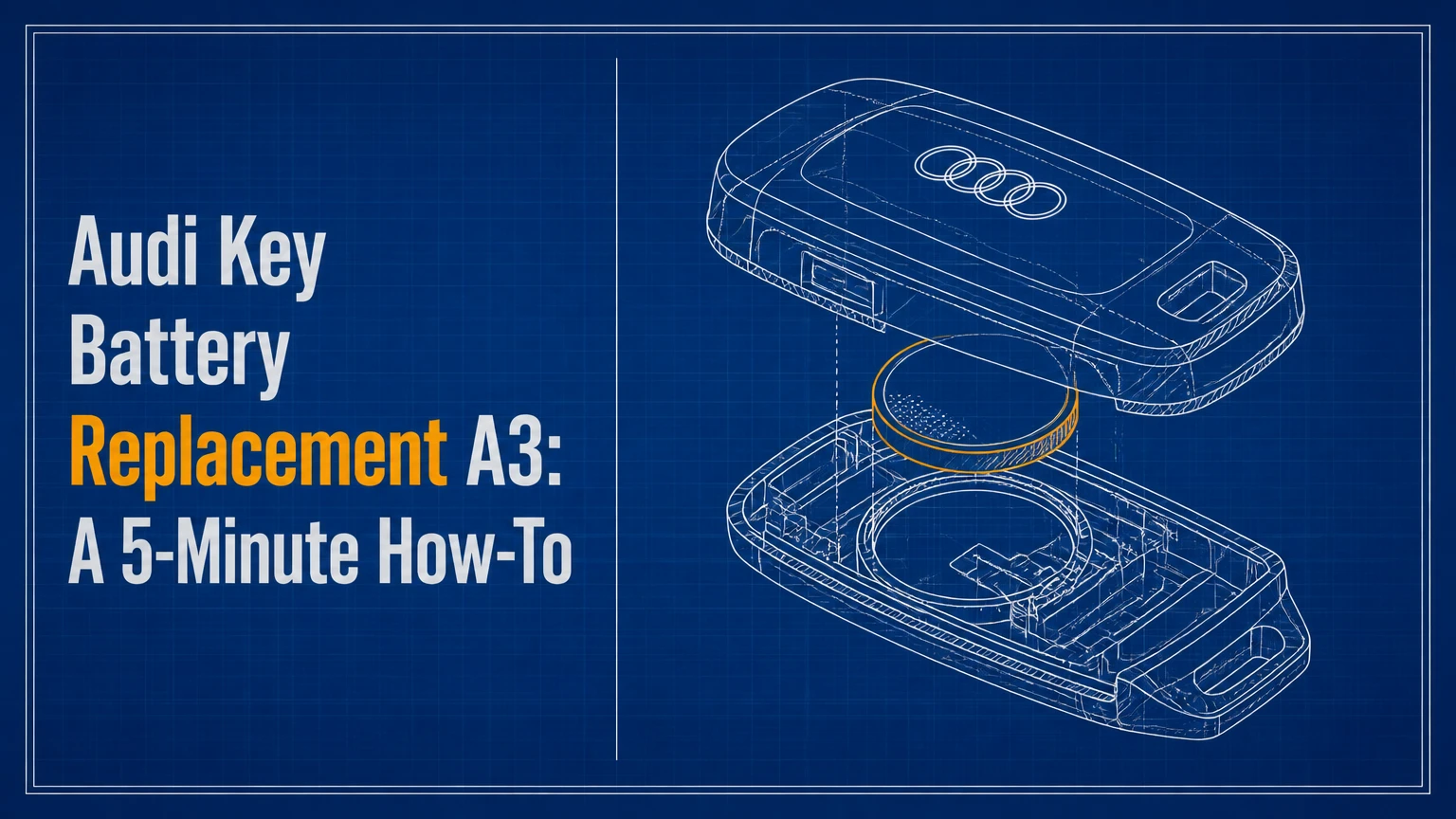
Audi A3 key battery replacement normally requires one CR2032 lithium coin cell and takes about 3-5 minutes. The exact opening method depends on whether the Audi A3 has a flip key or a newer smart key, and the molded polarity mark inside the fob takes priority over any general battery-orientation rule.
Key Facts at a Glance
Most Audi A3 remote keys from 2006 onward use one CR2032, 3-volt lithium battery.
A typical DIY replacement costs $3-$8 for a branded two-pack and takes 3-5 minutes.
A flip key has an exposed switchblade blade; a smart key stores the emergency blade inside the housing.
The positive side is often upward, but the polarity diagram inside the specific fob is authoritative.
Battery replacement does not program a new key, add immobilizer authorization, or repair damaged electronics.
A remote that remains unresponsive after a correct installation needs diagnosis, not repeated battery changes.
Before You Start
Audi A3 key battery replacement is a low-risk DIY task when the fob housing opens at its intended seam. Prepare a fresh CR2032, a clean work surface, and either the emergency key blade or a plastic pry tool; a small flathead screwdriver is optional, but metal tools can mark glossy plastic.
| Requirement | Typical specification | Practical note |
|---|---|---|
| Replacement cell | 1 x CR2032, 3V | Buy one per key; a two-pack typically costs $3-$8 |
| Working time | 3-5 minutes | Add 5-15 minutes if resynchronization is needed |
| Tools | 0-1 pry tools | Emergency blade, plastic pick, or small flathead |
| Difficulty | Low | Delicate latch tabs create the main risk |
| Workspace | 1 clean, dry surface | Prevents dust and coin-cell loss |
| Safety | Keep cell away from children and pets | Swallowed lithium coin cells require emergency medical help |
Inspect the old battery before removing it. Record its code, note which face points upward, and photograph the compartment if the molded symbols are difficult to read. Audi key housings vary by market, equipment package, and replacement-fob source, so the vehicle year is a useful clue rather than a guarantee.
What Battery Does an Audi A3 Key Use?
Most Audi A3 key fobs use a single CR2032 lithium coin cell rated at 3 volts. The CR2032 designation identifies a 20-millimeter diameter battery that is 3.2 millimeters thick, while the remote electronics determine whether the cell provides adequate operating range.
The replacement battery should be clean, undamaged, and within its stated shelf life. Panasonic, Energizer, and Duracell are common branded options, but brand alone cannot correct a bent contact, corroded terminal, cracked housing, or failing transmitter.
Does Every Audi A3 Use a CR2032?
No battery rule should be based only on an Audi A3 model year. Most A3 remotes use CR2032, including many 8P, 8V, and 8Y keys, but an aftermarket housing, replacement remote, or market-specific key can carry a different marking.
| Audi A3 generation | Approximate production period | Common key appearance | Common battery indication |
|---|---|---|---|
| 8P | 2003-2013 | Matte flip key, exposed blade | CR2032 in many original remotes |
| Early 8V | 2012-2016 | Flip key or early keyless design | CR2032 in many original remotes |
| Facelift 8V | 2016-2020 | Sleeker smart key on equipped cars | CR2032 in many original remotes |
| 8Y | 2020-present | Smart key with concealed emergency blade | CR2032 in many original remotes |
Read the code printed on the existing cell or inside the battery tray before buying. A CR2025 has the same diameter but is thinner than a CR2032, so substituting it can produce weak contact and intermittent operation even when the remote appears to work.
Which Audi A3 Key Style Do You Have?
An Audi A3 flip key has a button-operated metal blade that pivots out of the fob, while an Audi A3 smart key stores a removable emergency blade inside the body. Identifying the housing first prevents the most common mistake, prying at the wrong seam and breaking a retaining tab.
| Key style | Identification test | Battery-access method | Typical A3 application |
|---|---|---|---|
| Flip key | Blade folds out after pressing silver button | Release or pry rear battery cover | Many 8P and early 8V vehicles |
| Smart key | Emergency blade slides out of the housing | Remove blade, then release rear cover | Many facelift 8V and 8Y vehicles |
| Aftermarket shell | Logo, button layout, or seam differs from factory key | Follow shell design and cell marking | Replacement cases and used remotes |
| Damaged housing | Loose cover, broken latch, exposed circuit board | Avoid force; inspect before opening | Any generation or key style |
Button layout is less reliable than the blade mechanism. A push-button-start Audi A3 usually has a smart key, but equipment and replacement-key history can produce exceptions.
How Do You Replace an Audi A3 Smart-Key Battery?
Replace an Audi A3 smart-key battery by removing the emergency blade, opening the marked release area, exchanging the CR2032 with the original polarity, and snapping the cover closed. The procedure usually takes 3-5 minutes, and the success checkpoint is a firm cover with no gap around the battery compartment.
Step 1: Remove the Emergency Blade
Press the release buttons on the side or rear of the smart key and slide the metal emergency blade out. Set the blade beside the fob rather than on the vehicle roof, where it can scratch paint or fall into a drain channel.
You will know this step worked when the blade separates without bending and a slot or release recess becomes visible. Do not insert a screwdriver into the button openings, because those openings operate the blade latch rather than the battery cover.
Step 2: Open the Key Housing
Insert the emergency blade tip only into the designated release slot, or use a plastic pry tool at the housing seam. Apply gentle, controlled pressure and work around the release point instead of twisting the entire cover.
You will know the cover is released when one edge lifts and the remaining clips separate with light finger pressure. A common mistake is forcing the center seam before disengaging the latch, which can whiten the plastic, crack the cover, or break a clip that the replacement battery cannot fix.
Step 3: Replace the Coin Cell
Lift the old CR2032 from its recess without bending the metal contact. Wipe the new battery with a clean, dry cloth, remove any protective film, and install it with the same orientation as the old cell and the diagram molded into the tray.
You will know the battery is seated when it lies flat and the retaining spring holds its edge without excessive pressure. Do not use pliers across the cell, because shorting the terminals can reduce battery life and damage the thin metal contact.
Step 4: Close and Test the Fob
Align the cover with the housing, press around its perimeter until each clip engages, and slide the emergency blade back into place. Stand near the Audi A3, press lock or unlock, and confirm the red indicator light responds if the fob has one.
You will know the replacement worked when the vehicle locks or unlocks consistently from several meters away. A single successful press is not enough evidence, because a poorly seated cell can make intermittent contact when the fob moves.
How Do You Replace an Audi A3 Flip-Key Battery?
Replace an Audi A3 flip-key battery by extending the blade, releasing the rear battery cover, lifting out the old CR2032, and pressing the cover back into place. The battery compartment is usually on the side opposite the buttons, but the exact release recess differs between original and aftermarket shells.
Step 1: Extend the Blade and Find the Cover
Press the silver blade-release button so the metal key flips outward. Examine the rear and lower edge for a notch, coin slot, or small seam intended for cover removal.
You will know the correct location is found when the cover has a visible joint or slight movement under light pressure. Do not pry near the Audi rings or button membrane, because those areas are not designed to release the battery door.
Step 2: Release the Battery Cover
Use a plastic pick, coin edge, or small flathead screwdriver to lift the cover at the release recess. Protect painted or glossy surfaces with a thin piece of card, and use short movements rather than a single hard twist.
You will know the cover is free when it lifts without bending. The common error is levering against a decorative trim panel, which may separate the wrong plastic section and leave the remote with a loose button assembly.
Step 3: Install the New CR2032
Remove the old cell and compare its position with the new one before inserting it. Keep the positive and negative faces in the same orientation unless the compartment diagram clearly specifies another arrangement.
You will know the cell is installed correctly when it sits flush, the contact spring remains aligned, and the cover closes without pressure. A cover that bulges usually indicates an incorrectly seated battery or a misplaced contact spring.
Step 4: Refit the Cover and Test
Engage the cover at its fixed edge first, then press the release side until it clicks. Test lock, unlock, and trunk functions separately, because a weak button membrane or worn switch can affect only one command.
Which CR2032 Should You Buy?
Buy a fresh branded CR2032 from a retailer with reliable stock rotation, but verify the code and thickness before installation. A reputable brand can reduce variability, while a correctly sized cell with clean contacts matters more than branding when the remote range has already declined.
| Battery option | Nominal voltage | Typical purchase price | Best use |
|---|---|---|---|
| Panasonic CR2032 | 3V | $2-$5 per cell | Long-storage spare or regular replacement |
| Energizer CR2032 | 3V | $2-$5 per cell | Widely available replacement |
| Duracell CR2032 | 3V | $2-$6 per cell | Retail availability and branded packaging |
| Generic CR2032 | 3V | $1-$3 per cell | Budget use with verified dimensions and date |
Avoid cells with torn wrapping, visible corrosion, missing insulation, or an unidentifiable code. Do not stack two batteries, substitute a CR2025 without checking fit, or touch both broad faces repeatedly because finger oils can contaminate contacts.
What Is the Real Replacement Cost?
A DIY Audi A3 key battery replacement typically costs $3-$8 when buying a branded two-pack. A locksmith may charge approximately $10-$30 for a battery-only service, while a dealer visit can cost more if diagnosis, key testing, or programming is included.
| Service route | Typical battery cost | Typical labor or service cost | Typical elapsed time |
|---|---|---|---|
| DIY replacement | $1.50-$4 per cell | $0 | 3-5 minutes |
| Automotive locksmith | Included or $2-$8 | $10-$30 | 10-30 minutes |
| Audi dealer battery service | Included or $3-$10 | $20-$75 | 15-45 minutes |
| New programmed key | $150-$500+ | Included in key service | 30-120 minutes |
These are typical consumer ranges, not fixed prices. Dealer pricing varies by country, labor rate, key part number, and whether the vehicle needs diagnostic access.
What Should You Check After Replacement?
Check polarity, cell seating, contact condition, button response, and operating range in that order. Audi A3 remotes that fail after a battery change usually have an orientation, contact, cover-pressure, or synchronization problem before they have a completely failed circuit board.
Common Mistakes and How to Fix Them
- Battery installed upside down: Reopen the fob and match the plus sign to the tray marking. Do not rely on a generic “positive side up” rule.
- Protective film left on the cell: Remove the transparent or bitterant coating from the battery surface. A film can block electrical contact entirely.
- Loose or bent contact: Compare the spring position with the old battery and lift it slightly only if it is visibly flattened. Excessive bending can snap the terminal.
- Cover not fully clipped: Press the perimeter evenly and inspect for a raised corner. Housing pressure can make a marginal contact work intermittently.
- Dirty terminals: Remove the cell and wipe accessible contacts with a dry lint-free cloth. Avoid flooding the circuit board with solvent.
- Weak replacement cell: Install a new cell from a sealed package with a readable date or lot marking. A battery that measures acceptable without load can still collapse during transmitter operation.
An expert rule of thumb is to test the second key immediately after replacing the first. If both keys show reduced range, the cause may be vehicle-side interference, a receiver problem, or environmental conditions rather than two unrelated bad batteries.
How Do You Resynchronize the Audi A3 Remote?
Resynchronize the Audi A3 remote only after confirming the new battery is correctly installed and the vehicle still fails to respond. A common manual procedure uses the mechanical key in the driver’s door and a remote-button press, but the exact sequence varies by generation and market.
Try this recovery sequence:
- Use the emergency blade to lock the driver’s door manually.
- Unlock the door with the blade.
- Press the remote unlock button while standing beside the vehicle.
- Wait several seconds, then test lock and unlock again.
- If the vehicle has a slot or marked emergency-start location, place the fob there and attempt a start.
The sequence may restore remote locking, but it does not program a replacement key or authorize a new immobilizer transponder. If the red fob light remains dark after a known-good battery, synchronization is unlikely to be the primary fault.
Can You Start an Audi A3 With a Dead Key Battery?
You can usually start an Audi A3 with a dead remote battery because the immobilizer transponder and emergency-start procedure can remain available. The exact location varies, so consult the vehicle handbook for the key slot, steering-column marking, or designated placement area.
For push-button-start models, hold the key against the marked steering-column area or place it in the vehicle’s emergency reader location while pressing the brake and start control. For a conventional ignition, insert the mechanical key and turn it normally.
A dead coin cell does not automatically mean the key has lost authorization. Do not confuse a remote-locking failure with an immobilizer fault.
Why Does the Audi A3 Key Still Not Work?
An Audi A3 key that remains inactive after battery replacement most often has incorrect polarity, poor contact, a damaged housing, a failed button circuit, or lost remote synchronization. A working red indicator does not prove that the vehicle receiver is accepting the radio signal.
| Symptom after replacement | Most likely cause | Next diagnostic action |
|---|---|---|
| No red light and no remote response | Cell orientation, dead cell, broken contact | Recheck code, polarity, and terminal pressure |
| Red light works, car does not respond | Synchronization or vehicle receiver issue | Try the applicable resync procedure |
| Works only when squeezed | Loose cover or marginal contact | Inspect clips, battery fit, and spring terminal |
| Lock works, unlock fails | Worn button or switch circuit | Test each button and inspect membrane |
| Key starts car but remote is dead | Remote section fault or synchronization | Focus on receiver and transmitter diagnosis |
| Range fails only in cold weather | Low cell output or environmental voltage drop | Replace with fresh branded cell and retest warm |
A coin-cell tester that reports voltage is useful but incomplete. Remote transmitters draw current in short pulses, so a battery can show near 3 volts at rest and still fail under load.
When Is Battery Replacement Not Enough?
Battery replacement is not enough when the fob has water damage, a broken circuit board, persistent button failure, or an unprogrammed replacement key. A dealer or automotive locksmith is appropriate when immobilizer authorization, key adaptation, or security-code access is required.
Battery service is also the wrong remedy when several remotes fail simultaneously, the car has a weak vehicle battery, or the remote works beside the vehicle but not at normal distance. Those symptoms point toward vehicle electronics, radio interference, or receiver diagnosis.
Audi A3 key battery replacement cannot create a spare key. It also cannot repair a cracked solder joint or recover a remote that has suffered liquid intrusion.
How Should You Handle and Dispose of the Old Cell?
Handle a CR2032 as a hazardous small battery, keep it away from children and pets, and cover both sides with nonconductive tape before transport if local recycling guidance recommends it. Never place a loose coin cell in a pocket, drawer with metal objects, or household recycling stream unless local rules allow it.
Many municipal recycling centers, electronics retailers, and battery collection programs accept lithium coin cells. Follow the disposal rules in your country because collection systems differ, and never burn, crush, recharge, or puncture a CR2032.
FAQ
How often should an Audi A3 key battery be replaced?
An Audi A3 key battery commonly lasts 2-4 years, but use frequency, button-press count, storage temperature, and battery quality change the interval. Replace it when range declines, the vehicle displays a key warning, or the remote becomes intermittent rather than waiting until the cell is completely flat.
Can an Audi A3 key battery be changed without resynchronizing?
Yes. Most Audi A3 remotes continue working immediately after a straightforward battery exchange because the replacement does not erase the key’s stored identity. Resynchronization is a recovery step for a remote that does not respond after polarity, contact, and cover fit have been verified.
Does a CR2025 work in an Audi A3 key?
A CR2025 has the same 20-millimeter diameter as a CR2032 but is 0.7 millimeters thinner. It may make unreliable contact in a compartment designed for CR2032, so use the battery code printed in the original fob rather than choosing a thinner substitute.
Why does the Audi A3 show a key-not-detected warning with a new battery?
A key-not-detected warning can result from poor battery contact, an unrecognized remote, vehicle battery weakness, radio interference, or a fault in the keyless-entry receiver. Test the emergency-start location first, then inspect the coin cell and try the vehicle-specific synchronization procedure.
Will a dealer replace only the Audi A3 key battery?
Yes, an Audi dealer can usually replace only the coin cell when the original fob is intact. Dealer charges may exceed a DIY replacement because the appointment can include key testing or diagnostic work; ask whether the quoted price covers battery service alone or programming.
The Bottom Line
Audi key battery replacement for an A3 normally means installing one correctly marked CR2032 in 3-5 minutes. Identify the flip-key or smart-key housing, copy the existing polarity, protect the retaining contacts, and test every remote button. If the fob still fails, diagnose synchronization, contacts, transmitter damage, and vehicle reception before buying another battery.


