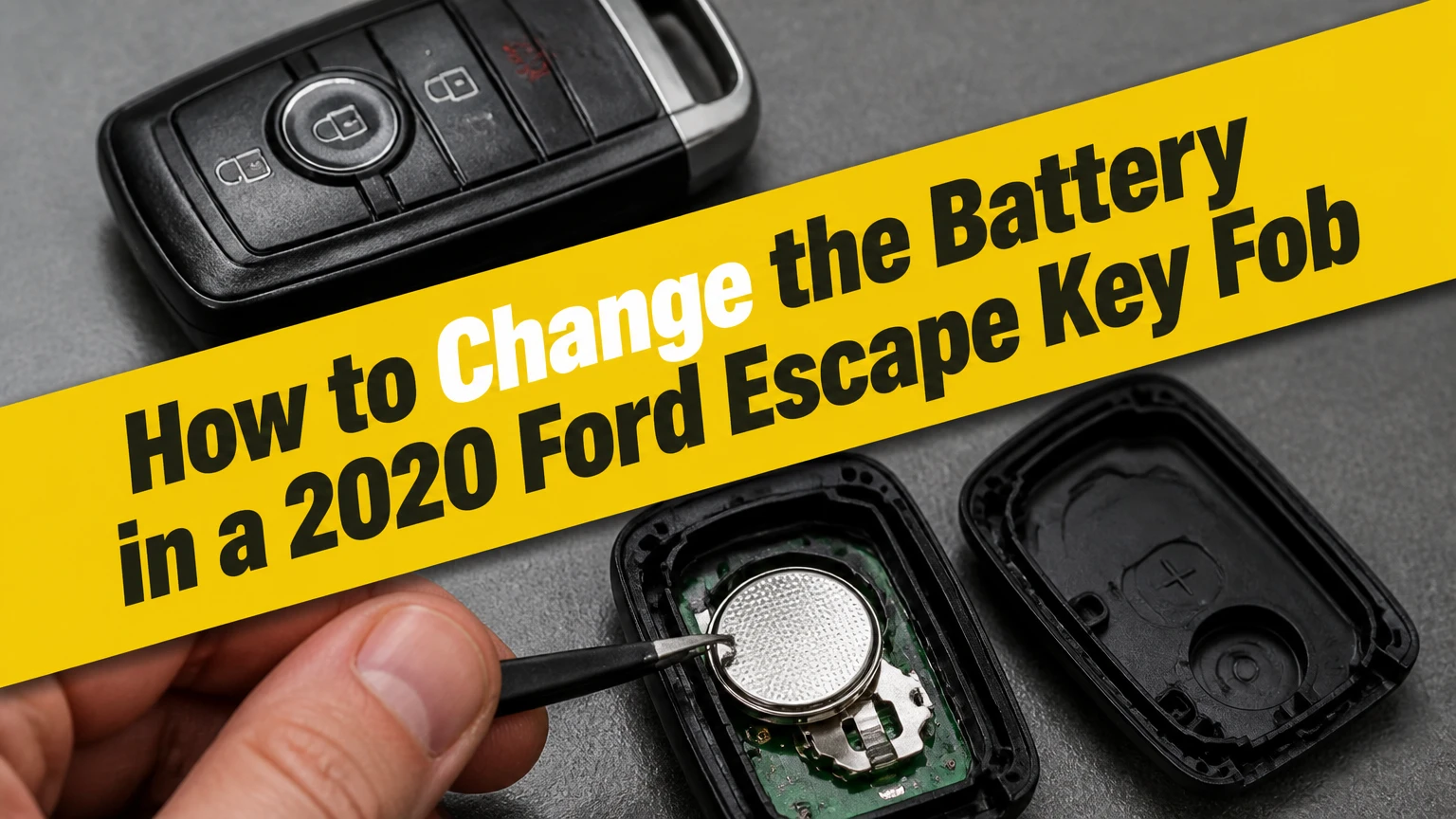
To change the battery in a 2020 Ford Escape key fob, first identify whether you have an Intelligent Access smart key or a flip-key remote. The smart key normally takes a CR2450, while the flip key normally takes a CR2032. Open the case, install the 3-volt lithium cell with the positive side up, and snap the housing closed.
Key Facts at a Glance
- A 2020 Ford Escape Intelligent Access fob normally uses one CR2450 3-volt lithium coin cell.
- A 2020 Ford Escape flip-key remote normally uses one CR2032 3-volt lithium coin cell.
- Battery replacement usually takes 2-5 minutes and does not erase the fob’s programmed vehicle identity.
- A small flathead screwdriver or the removed emergency key can open many Escape fob housings.
- The positive side of the replacement battery normally faces upward toward the rear cover.
- A fob that remains dead after replacement may have reversed polarity, bent contacts, a damaged circuit board, or a vehicle-side fault.
Which 2020 Ford Escape Fob Do You Have?
The 2020 Ford Escape key-fob style determines the replacement battery and opening method. An Intelligent Access fob has a removable emergency key hidden inside the housing and is used with push-button starting, while a flip-key remote has a blade that pivots out from the remote body.
Look at the physical key before buying a battery. Do not rely only on the vehicle year or an online parts listing, because replacement housings and aftermarket remotes can differ from the original Ford equipment.
| Fob characteristic | Intelligent Access smart key | Flip-key remote |
|---|---|---|
| Physical blade | Slides out of the fob | Folds into the fob |
| Typical vehicle interface | Push-button start | Mechanical ignition key |
| Typical battery | CR2450, 3 volts | CR2032, 3 volts |
| Battery diameter | 24 millimeters | 20 millimeters |
| Battery thickness | About 5.0 millimeters | About 3.2 millimeters |
| Opening access | Internal emergency-key slot | Recessed slot near folded blade |
| Replacement time | About 3-5 minutes | About 2-4 minutes |
The battery designation is printed on the old coin cell. If the marking is unreadable, open the fob carefully and compare the battery’s printed model with the table. A CR2032 is not a substitute for a CR2450 merely because both batteries produce 3 volts. Their diameters and thicknesses differ, so the wrong cell can fail to contact the terminals or can strain the housing.
What Do You Need Before Starting?
A 2020 Ford Escape battery replacement requires one correct 3-volt lithium coin cell and a narrow, non-sharp prying tool. A small flathead screwdriver works, but a plastic trim tool reduces the chance of scratching the case or breaking an internal clip.
Before You Start
| Requirement | Typical value | Practical note |
|---|---|---|
| Replacement cell | 1 battery | CR2450 or CR2032, matched to the fob |
| Battery voltage | 3 volts DC | Use a lithium coin cell, not an alkaline substitute |
| Tool | 1 small tool | Flathead screwdriver or plastic pry tool |
| Work time | 2-5 minutes | Add time if the cover is tight |
| DIY battery cost | $2-$8 | Typical retail range for a branded single or multipack |
| Surface | 1 clean, dry area | Prevents dropped clips and contamination |
Wash and dry your hands, then handle the replacement battery by its edge. Ford’s owner-support guidance emphasizes using the specified coin-cell type and keeping the fob components in their intended orientation. The practical reason is simple: the circuit board, spring contacts, rubber button membrane, and battery retaining clip all depend on correct fitment.
Do not pry directly against the circuit board. The board carries the radio transmitter and immobilizer-related electronics, and a screwdriver slip can damage a component that costs far more than the battery.
How Does the Key Fob Battery Work?
The 2020 Ford Escape key fob uses a 3-volt lithium coin cell to power its radio-frequency transmitter and control electronics. Pressing a lock or unlock button sends an encrypted remote signal to the vehicle, while an Intelligent Access fob can also communicate when the fob is near the vehicle.
The battery does not normally store the fob’s vehicle pairing data. That information resides in nonvolatile electronic memory, so removing a depleted cell for a few minutes generally does not require reprogramming. A new battery restores power; it does not create a new remote identity.
Ford describes key fob replacement as a battery service rather than a key-programming operation. That distinction matters because owners sometimes pay for programming after a simple cell replacement. Programming becomes a separate issue when the remote itself is new, the circuit board is damaged, or the vehicle no longer recognizes the fob after basic troubleshooting.
How to Change the Battery in a 2020 Ford Escape Key Fob
The correct replacement sequence is to remove the blade or expose the pry slot, separate the housing without twisting the circuit board, replace the matching coin cell with the positive side up, and verify that the case closes evenly. Complete the process over a table so the battery and small housing pieces cannot fall into a seat rail.
Intelligent Access Smart Key
Use the Intelligent Access procedure when the fob has a hidden emergency key and your Escape starts with a dashboard-mounted push button.
Step 1: Remove the Emergency Key
Press the release button on the side or rear of the Intelligent Access fob. Pull the mechanical key blade completely out of its channel and set it beside the fob.
You will know the step worked when the internal key slot is open and the blade is no longer blocking the case seam. Do not pull the blade sideways, because lateral force can damage the release mechanism.
A common mistake is trying to split the case before removing the emergency key. The blade occupies the access channel and can prevent the retaining tabs from releasing.
Step 2: Open the Fob Housing
Insert the tip of the removed key blade, a plastic pry tool, or a small flathead screwdriver into the notch inside the empty emergency-key slot. Twist gently until the rear cover releases, then work around the seam only as needed.
The correct motion is a small controlled lever movement, not a deep insertion. Stop if the plastic begins to whiten, bend, or crack. That discoloration indicates excessive stress.
The success checkpoint is a clean separation of the rear cover from the main housing while the circuit board remains seated. A common mistake is inserting the screwdriver near a button or circuit-board edge instead of the molded internal notch.
Step 3: Remove the Old CR2450
Locate the circular battery holder and its retaining clip. Slide or depress the clip just enough to release the CR2450, then lift the cell out by its edge.
Do not stab the battery face with a screwdriver. A tool placed against the retaining edge gives better control and avoids scraping the nearby contact. If the fob contains a small amount of clear or translucent assembly residue, leave it in place unless it has contaminated the battery contacts.
You will know the step worked when the battery is out and the clip still springs back into its original position. A common mistake is bending the contact tab downward while forcing the cell out.
Step 4: Install the New CR2450
Slide one new CR2450 beneath the retaining edge with the positive side facing up. Press the cell flat until the clip holds it securely without excessive force.
The success checkpoint is a battery that sits level, cannot rattle, and remains in contact when the fob is gently moved. A common mistake is installing a CR2032 because it looks similar; the thinner cell may not reach the contact reliably.
Step 5: Close the Smart Key
Align the cover tabs with the housing slots, hook one edge into position, and press the two halves together around the perimeter. Reinsert the emergency key blade.
The case should close flush with a series of light clicks. If a seam remains open, remove the cover and check for a misaligned battery, rubber button membrane, or internal tab rather than applying more pressure.
Flip-Key Remote
Use the flip-key procedure when the physical blade pivots out of the remote body and the vehicle uses a conventional ignition slot.
Step 1: Deploy the Key Blade
Press the chrome or release button and swing the key blade fully out. Hold the remote so the buttons face down and the recessed blade channel is visible.
The extended blade exposes the molded opening used to separate the rear cover. A common mistake is forcing a screwdriver into the outer seam, where it can mark the plastic without releasing the correct clip.
Step 2: Locate the Interior Notch
Look inside the blade recess for the small rectangular notch or slot. Insert a narrow flathead screwdriver straight into that opening, keeping the tool aligned with the housing.
The success checkpoint is contact with the molded pry point rather than the circuit board. If the tool bottoms out immediately, withdraw it and check that the blade is fully deployed.
Step 3: Separate the Rear Cover
Twist the screwdriver slightly upward to unclip the battery cover. Use only enough force to release the first clip, then lift the cover away without flexing it sharply.
A common mistake is levering against the chrome blade or hinge. The hinge is designed to pivot the key, not to withstand repeated prying loads.
Step 4: Replace the CR2032
Remove the old CR2032 from its friction brackets and place the new CR2032 in the tray with the positive side facing up. Keep the cell centered beneath the retaining lips.
You will know the battery is seated when it lies flat and the metal contacts press against it without visible distortion. A common mistake is placing the negative side upward, which leaves the transmitter without the required polarity.
Step 5: Reassemble the Flip Key
Position the rear cover over the battery tray and press straight down until the clips engage. Fold the physical blade back into the remote body and test lock, unlock, and panic functions if equipped.
The housing should have an even perimeter seam. If one corner stands proud, reopen the fob and inspect the battery position and cover tabs instead of squeezing harder.
Which Battery, Cost, and Service Option Make Sense?
The correct cell is more important than the cheapest cell. Buy a fresh CR2450 for the Intelligent Access fob or a fresh CR2032 for the flip key from a retailer with controlled inventory, because coin cells lose useful shelf life when stored for years in heat.
| Replacement approach | Typical part cost | Typical total cost | Typical time | Best fit |
|---|---|---|---|---|
| DIY, branded coin cell | $2-$8 | $2-$8 | 2-5 minutes | Owner with steady hands |
| Auto-parts counter | $4-$12 | $4-$15 | 5-15 minutes | Owner wanting basic assistance |
| Automotive locksmith | $5-$15 | $15-$40 | 10-30 minutes | Damaged case or difficult opening |
| Ford dealer battery service | $5-$15 | $15-$40 | 15-45 minutes | Owner wanting vehicle-specific service |
| Complete replacement fob | $80-$250 | $150-$400 programmed | 30-120 minutes | Lost, damaged, or unrecognized fob |
The table shows typical market ranges, not Ford’s fixed national pricing. Dealer labor rates, locksmith travel fees, aftermarket housing quality, and whether programming is included can change the final bill substantially.
DIY replacement is appropriate when the buttons work intermittently, the dashboard displays a low-key-battery warning, and the housing is intact. Professional service is preferable when the fob has water intrusion, broken clips, missing buttons, a damaged blade, or a replacement remote that needs vehicle programming.
Does Replacing the Battery Require Reprogramming?
Replacing the battery in an existing 2020 Ford Escape key fob normally does not require reprogramming. The remote’s identity and vehicle association are retained while the coin cell is removed, so a correctly installed replacement should operate immediately.
Test the fob beside the vehicle after closing the case. Press lock and unlock once, then try the other buttons. Intelligent Access owners should also test passive entry and push-button starting under normal conditions.
A synchronization procedure is not a universal cure. Some Ford vehicles with a conventional keyed ignition can enter remote programming mode after repeated ignition-cycle commands, but the exact sequence depends on the vehicle system and owner’s manual. The commonly repeated eight-cycle procedure should not be applied blindly to every 2020 Escape, especially a push-button-start model.
A newly purchased or aftermarket fob is different from a battery replacement. New fob programming may require two already programmed keys, a scan tool, a dealer, or an automotive locksmith, depending on the Escape configuration.
What If the New Battery Does Not Work?
A 2020 Ford Escape key fob that remains inoperative after battery replacement most often has a polarity, contact, seating, or cover problem. Reopen the housing and check the battery model, positive-side orientation, retaining clip, and metal contacts before assuming the remote needs programming.
Use this diagnostic order:
- Confirm the battery model. Read CR2450 or CR2032 directly from the old cell or fob holder.
- Check polarity. The plus-marked face normally points toward the rear cover.
- Inspect the contacts. A retaining tab bent below the cell will interrupt power.
- Check seating. The coin cell must lie flat beneath the retaining lip.
- Test another fresh cell. A battery can be discharged or damaged before purchase.
- Inspect the housing. A loose cover can prevent reliable pressure on the contacts.
- Test the vehicle battery. Low vehicle voltage can create multiple electrical symptoms.
- Try the spare fob. If both remotes fail, investigate the vehicle rather than one coin cell.
Gently lift a flattened contact tab only enough to restore spring pressure, and use a plastic tool where possible. Stop when a tab separates from its mounting point, because that repair requires board-level soldering or fob replacement.
Visible grease is not automatically dielectric grease. Some fobs contain assembly lubricant, residue from a previous repair, or contamination from a leaking cell, so do not spread unknown material across the circuit board. Clean only obvious corrosion with an electronics-safe method and seek professional service if the board is wet, green, or burned.
How Can You Start the Escape With a Dead Smart Fob?
A 2020 Ford Escape with a dead Intelligent Access battery can often start when the fob is placed in the vehicle’s designated backup-reader location. Ford places the backup location according to vehicle configuration, so the owner’s manual is the authoritative source for the exact slot.
Common locations may include a marked area in the center console or a dedicated backup pocket. The location is not guaranteed to be the same across every trim, market, or replacement console design.
Use the emergency mechanical key to unlock the driver’s door if remote unlocking fails. Then place the smart key in the documented backup position and press the brake and engine-start button. If the vehicle still reports that no key is detected, move other keys, phones, and metal objects away from the reader and test the spare fob.
The backup reader is an emergency starting method, not a substitute for replacing a depleted battery. It may allow the engine to start while remote locking, passive entry, and button functions remain unavailable.
What Mistakes Shorten Battery Life?
The most common battery-life mistakes are buying old stock, storing coin cells in a hot vehicle, pressing buttons while the fob is loose in a pocket, and allowing a button to remain continuously depressed inside a tight case or aftermarket cover.
Practitioner rules help avoid repeat failures:
- Replace both active fobs when they were installed at the same time and show similar age.
- Keep a spare cell in its sealed package at home rather than in a hot glovebox.
- Photograph the battery orientation before removing the old cell.
- Do not stack coin cells or add foil, paper, or improvised spacers.
- Keep the circuit board dry and avoid touching its contacts unnecessarily.
Ford’s key-fob guidance supports using the specified battery type, but battery longevity varies with button usage, passive-entry polling, temperature, and cell quality. A typical replacement interval is 2-4 years, not a guaranteed service life.
Frequently Asked Questions
Can I use a CR2032 instead of a CR2450?
No, not as a normal substitute. A CR2032 is 20 millimeters wide and about 3.2 millimeters thick, while a CR2450 is 24 millimeters wide and about 5.0 millimeters thick. The smaller, thinner battery may not contact the Intelligent Access fob terminals and can move inside the holder.
Will I lose my key if the battery dies?
No. A dead coin-cell battery does not erase the mechanical key or normally remove the programmed identity from the remote. The buttons and passive-entry functions stop working, but the emergency blade and backup starting method remain available according to the vehicle configuration.
How do I know whether the fob battery is actually low?
A low-key-battery message, reduced remote range, intermittent lock response, or passive-entry failure points toward a weak cell. If a fresh, correctly oriented battery changes nothing, test the spare fob and inspect the contacts before buying a replacement remote.
Can an auto-parts store replace the battery?
Many auto-parts retailers will install a coin cell purchased at their counter, but the service is store-specific. Ask whether the employee will open the exact fob style and whether assistance is free, because some stores sell the battery without offering installation.
Should I replace the battery in my spare fob?
Replace the spare fob battery when it is the same age as the active fob or shows reduced range. A spare with a fresh cell is more useful during a lockout, but store the replacement battery separately from loose metal objects and away from children.
What if the key fob case is cracked?
A cracked case can prevent the battery from maintaining contact and can expose the circuit board to moisture. Replace the housing if the board and buttons remain healthy, or have a locksmith or Ford dealer evaluate the fob if the blade, transponder, or electronics are also damaged.
The Bottom Line
The fastest way to change the battery in a 2020 Ford Escape key fob is to identify the housing first, then install the matching CR2450 or CR2032 with its positive face up. The job normally takes 2-5 minutes, costs $2-$8 as a DIY repair, and does not erase programming. If the replacement fails, check polarity, battery seating, contact pressure, and the spare fob before paying for reprogramming.


