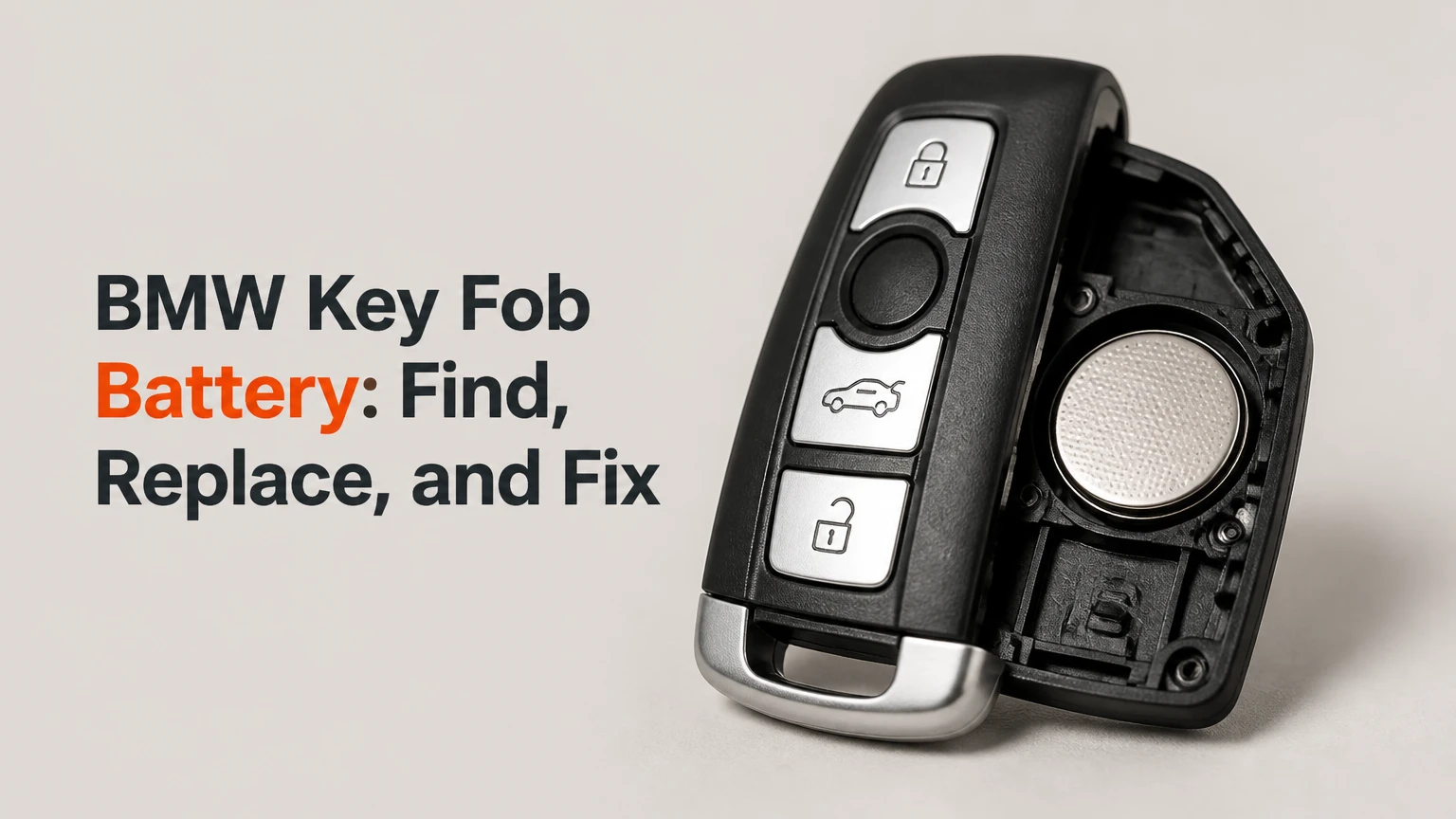
A BMW key fob battery is usually a replaceable CR2032 or CR2450 lithium coin cell, but older BMW diamond keys commonly use a rechargeable VL2020 and BMW Display Keys use a rechargeable battery pack. Identify the fob housing first, then install the specified battery with the correct polarity; ordinary replacement normally does not erase key programming.
Key Facts at a Glance
- Most BMW smart blade and shield-style keys use a CR2032 battery.
- Many F-Series slant-style keys use the thicker CR2450 battery.
- A BMW Display Key charges through USB or a wireless charging tray rather than using a standard coin cell.
- Older sealed diamond keys commonly contain a soldered, rechargeable VL2020 cell.
- A replaceable battery swap normally takes 2-5 minutes and does not require reprogramming.
- A dead battery usually does not prevent engine starting because BMW provides a passive emergency-start function.
Which Battery Fits a BMW Key Fob?
The correct BMW key fob battery depends on the key’s physical design and internal holder, not simply the vehicle’s badge or model year. Remove the emergency blade and inspect the rear cover, molded battery marking, and existing cell before ordering; model-year charts are useful for narrowing the choice but cannot resolve every market and equipment variation.
| BMW key design | Typical vehicle period or examples | Battery | Replacement condition |
|---|---|---|---|
| Diamond-shaped sealed key | E39, E46, E53, approximately 1999-2006 | VL2020 rechargeable | Soldered, difficult DIY repair |
| Rectangular older key with battery door | Some E90, E60, E70 variants, approximately 2006-2011 | CR2032 | User replaceable |
| Slant-style F-Series key | F30, F10, F25, F15, approximately 2009-2018 | CR2450 | User replaceable |
| Smart blade or shield key | G20, G05, G07 and many 2018-present models | CR2032 | User replaceable |
| BMW Display Key | Selected G11, G30, G05 and high-equipment variants | Rechargeable lithium-ion pack | Specialized repair or replacement |
A CR2032 measures approximately 20 millimeters in diameter and 3.2 millimeters thick. A CR2450 has the same nominal diameter but measures approximately 4.5 millimeters thick, so a CR2032 may rattle in a CR2450 holder while a CR2450 may crush contacts or prevent the cover from closing.
The safest identification method is simple: read the code printed on the old cell and compare it with the marking inside the fob. If the key is sealed, do not buy a CR2032 merely because a search result associates that battery with the vehicle model.
How Do CR2032 and CR2450 Differ?
CR2450 batteries are thicker and typically offer more nominal capacity than CR2032 batteries, but BMW key fobs are designed around a specific contact height. A CR2032 cannot reliably replace a CR2450, and forcing a CR2450 into a CR2032 housing can damage the plastic or spring contacts.
| Specification | CR2032 | CR2450 | Practical BMW consequence |
|---|---|---|---|
| Nominal diameter | 20 mm | 24 mm | Do not interchange by thickness alone |
| Nominal thickness | 3.2 mm | 5.0 mm | Holder clearance determines fit |
| Typical capacity range | 210-240 mAh | 500-620 mAh | Capacity varies by manufacturer and load |
| Common BMW application | Smart blade or shield key | F-Series slant key | Confirm the holder before purchase |
The designation is dimensional. “CR” identifies a manganese-dioxide lithium chemistry, while the numbers describe approximate diameter and thickness in millimeters. Brand, production date, and storage conditions affect real service life more than a small difference in printed capacity.
What Should You Check Before Replacing the Battery?
Before replacing a BMW key fob battery, confirm the battery code, gather a plastic pry tool or the emergency blade, and protect the work surface from static and scratches. The highest-risk mistake is buying the right-looking cell for the wrong holder, especially when an F-Series key and a newer G-Series key are both nearby.
Before You Start
| Requirement | Typical value | Why it matters |
|---|---|---|
| Work time, replaceable coin cell | 2-5 minutes | Includes opening and function testing |
| Work time, Display Key | 10-30 minutes | Battery pack access varies by housing |
| Battery cost | $3-$10 for a branded 2-pack | Panasonic, Energizer, and Duracell are common choices |
| Primary tool | Emergency blade or plastic pry tool | Reduces scratches and housing damage |
| Backup tool | 1-2 mm flat plastic pick | Helps release a tight cover |
| Required prerequisite | Correct cell code and polarity | Prevents contact and fit errors |
Use a new battery from a sealed package with a visible expiration date. Do not stack two coin cells, bend the terminals, or test a lithium coin cell by shorting its faces with metal pliers.
How Do You Replace a Modern BMW Key Fob Battery?
Replace a modern BMW key fob battery in four controlled steps: remove the emergency blade, release the rear cover, install the matching cell, and test every button near the vehicle. The key’s opening notch and battery-contact arrangement differ between F-Series slant keys and G-Series smart keys, so use light pressure rather than prying around the entire perimeter.
Step 1: Identify the Key and Buy the Cell
Turn the fob over and locate the emergency-key release button. Press the release, pull out the metal blade, and inspect the cavity and rear cover for a release tab or notch.
For a slant-style F-Series key, confirm whether the original cell is marked CR2450. For a smart blade or shield-style key, the cell is commonly CR2032. Buy one correctly sized lithium coin cell, not a rechargeable substitute unless the fob specifically uses a rechargeable design.
You will know this step worked when: the metal blade is out and the replacement code matches the original or the internal molded marking.
Common mistake: choosing CR2032 because it is the most widely sold key-fob battery. The smaller cell is not a universal substitute for CR2450.
Step 2: Remove the Emergency Key and Cover
Insert the tip of the emergency blade into the designated notch on many F-Series housings, then twist gently until the rear cover lifts. On many G-Series keys, lift the tab inside the emergency-key cavity and separate the cover from that point.
Avoid inserting a screwdriver deeply beside the circuit board. A metal tool can scratch the housing, slip into the printed circuit board, or bridge battery contacts.
You will know this step worked when: the cover separates without bending, cracking, or leaving a displaced button membrane.
Common mistake: forcing the cover from the wrong edge. Rotate the fob and search for the molded release point before applying more pressure.
Step 3: Install the Battery Correctly
Photograph the old battery before removal, then lift it from the holder with a plastic pick or fingernail. Install the new cell in the same orientation, usually with the positive side marked “+” facing upward, although the holder’s molded symbol takes priority.
For a CR2450 holder, seat the battery edge under the fixed plastic lip first, then press the opposite edge below the spring contact. Do not flatten or pry the spring more than necessary.
You will know this step worked when: the battery sits flush, the contact does not slide off the edge, and the cover closes without pressure.
Common mistake: leaving a plastic shipping film on the cell. Remove any film or label that covers the electrical contact surface, but do not scrape a manufacturer’s printed coating from the battery.
Step 4: Close the Housing and Test the Key
Snap the rear cover into place along its original edges, reinsert the emergency blade, and test lock, unlock, trunk, and panic functions from several meters away. Then test Comfort Access by touching the door handle if the BMW is equipped with that feature.
You will know this step worked when: the buttons operate consistently, the vehicle recognizes the key, and the cover remains fully seated.
Common mistake: testing only the lock button. A damaged or contaminated button membrane can affect one function while the battery remains healthy.
Does a BMW Key Need Reprogramming After Battery Replacement?
A BMW key normally does not need reprogramming after a routine battery replacement because the immobilizer and remote-control identity remain stored in the key. Re-synchronization is a separate procedure and is usually unnecessary unless the remote buttons stopped operating after an extended battery failure or the vehicle has a different fault.
Programming and battery replacement are different operations. Coding a replacement key may require BMW diagnostic equipment, a dealer, or a qualified automotive locksmith; changing a cell in the existing key generally does not.
What If the Key Uses a Rechargeable VL2020?
A BMW key containing a rechargeable VL2020 is not equivalent to a CR2032 key because the VL2020 is designed to recharge in the ignition or charging circuit and may be welded or soldered to tabs. Cutting the sealed case and soldering a replacement can damage the circuit board, reverse battery polarity, or compromise the housing.
Older diamond keys often recharge while driven, so a key that works briefly after a long drive but loses power again may have a deteriorated cell. A 10-15-year-old rechargeable battery is a reasonable failure suspect, but the key’s charging circuit and vehicle receiver can also be involved.
| Rechargeable-key symptom | Likely area | Sensible next action |
|---|---|---|
| Remote works after driving, then fades | Worn VL2020 cell | Locksmith inspection or cell replacement |
| No remote function after several drives | Cell, charging circuit, or board | Compare with spare key |
| Case is cracked after opening | Housing seal and button alignment | Replace housing or complete key |
| Key starts car but buttons fail | Remote battery or RF section | Test vehicle-side locking separately |
A replacement VL2020 must have the correct tab arrangement and polarity. A loose bare cell is not a safe drop-in replacement for a soldered design. An automotive locksmith is usually the better option unless the owner has soldering experience and accepts the risk of destroying a rare key.
What If You Have a BMW Display Key?
A BMW Display Key uses a rechargeable battery pack and should first be charged through its USB port or the vehicle’s compatible wireless charging tray. A charging icon, screen activity, or increased operating time after charging helps separate a depleted battery from a failed display, cable, charging port, or internal board.
BMW’s official vehicle-access guidance identifies charging through the Display Key’s charging interface and compatible in-car tray. Display Key construction varies, so the internal pack should be identified by its original part number or connector before ordering.
Do not install a CR2032 or CR2450 in a Display Key. A Display Key battery pack may have a connector, protection circuit, and shaped insulation that a coin cell does not provide.
Display Key Repair Choices
| Option | Typical cost | Typical time | Best use |
|---|---|---|---|
| USB or tray charging | $0 | 1-3 hours | Key is discharged but healthy |
| Replacement battery pack | $20-$60 | 15-30 minutes | Pack no longer holds charge |
| Locksmith or electronics repair | $50-$150 | 1-3 days | Housing or connector needs work |
| New Display Key and coding | $300-$600 | 1-3 days | Key, board, or screen is damaged |
Opening a Display Key can require a small Torx driver and plastic pry tools. Disconnect the battery plug before manipulating the board, and avoid puncturing the pouch cell. A swollen, hot, leaking, or physically damaged lithium battery should not be charged.
Why Does the BMW Still Say Key Not Detected?
A BMW can display “Key Not Detected” after battery replacement because of reversed polarity, a poorly seated cell, a protective film, a damaged fob contact, radio interference, or a vehicle-side antenna fault. Hold the key at the model-specific emergency-start location and press the Start/Stop button to test the passive transponder function.
The emergency-start location is commonly near the steering column marking, but BMW places backup antennas differently across models. The owner’s manual provides the authoritative location for a specific vehicle.
Troubleshooting Sequence
- Reopen the fob and inspect polarity. The positive face usually points upward, but the molded holder symbol is decisive.
- Check the cell surface. Remove shipping film, fingerprints, and residue with a clean, dry cloth.
- Inspect contact pressure. The spring terminal must touch the battery firmly without gouging its edge.
- Try the spare key. If the spare works normally, the first fob is the likely fault.
- Move away from interference. Phone chargers, wireless charging pads, laptops, and metal cases can reduce convenient detection.
- Use emergency starting. Hold the key against the marked backup area, press the brake or clutch as applicable, and press Start/Stop.
- Check the vehicle battery. Low 12-volt voltage can create multiple access and key-recognition warnings.
- Seek diagnosis if both keys fail. A receiver, antenna, fuse, or vehicle control module may be involved.
A dead remote battery does not prove that the immobilizer has failed. The passive transponder can remain usable even when lock and unlock buttons no longer transmit.
Which Failure Modes Are Common?
The most common BMW key-fob failures after a battery change are wrong cell size, upside-down installation, poor terminal contact, and a cracked or incompletely closed housing. Water intrusion and worn microswitches create similar symptoms but require repair rather than another battery.
| Symptom | Probable cause | Corrective action |
|---|---|---|
| No buttons work immediately | Wrong polarity or protective film | Reinstall and clean contact surface |
| Cover will not close | CR2450 in CR2032 housing or poor seating | Verify code and holder depth |
| Range remains very short | Weak new cell, interference, damaged antenna | Try a second branded cell and spare key |
| One button fails | Worn switch or torn membrane | Repair the fob, not the battery |
| Key works after driving only | Rechargeable VL2020 degradation | Inspect charging circuit and cell |
| Both keys fail together | Vehicle battery or receiver fault | Test 12-volt system and scan vehicle |
A battery that tests at its printed nominal voltage can still fail under load if it is old, counterfeit, or internally damaged. For practical diagnosis, a fresh cell from a traceable retailer is more useful than repeatedly measuring an unknown battery with a basic multimeter.
How Can You Make the New Battery Last?
A branded lithium coin cell typically lasts 1-3 years in a BMW key, depending on button use, Comfort Access polling, temperature, and storage conditions. Battery life shortens when the key is kept pressed against a phone, stored in a hot car, or repeatedly activated inside a bag.
Use Panasonic, Energizer, Duracell, or another traceable manufacturer with recent production and intact packaging. Panasonic is frequently associated with automotive coin-cell supply, but brand name alone cannot compensate for incorrect size or poor contact.
Practical rules improve reliability:
- Keep the key away from continuous pressure inside a crowded pocket.
- Store a spare key in a dry location away from strong magnets and metal containers.
- Do not wash the fob or leave it in a vehicle exposed to summer heat.
- Replace a cell after repeated low-battery warnings instead of waiting for total failure.
- Never carry a loose coin cell with keys, coins, or tools that can short both faces.
Battery manufacturers specify storage and operating limits on their packaging. Exact service life is not guaranteed because Comfort Access-equipped vehicles may communicate with the key more frequently than a conventional remote-locking system.
How Much Does BMW Key Battery Replacement Cost?
A DIY replaceable-cell job usually costs $3-$10 and takes 2-5 minutes, while dealership labor commonly raises the visit to approximately $20-$50. Display Key repairs, soldered VL2020 work, and a fully new coded key cost substantially more.
| Service or part | Typical price range | Typical completion time | Coding usually required |
|---|---|---|---|
| CR2032 or CR2450 two-pack | $3-$10 | Immediate | No |
| Dealership coin-cell service | $20-$50 | 15-45 minutes | No |
| Locksmith VL2020 repair | $40-$120 | Same day to 3 days | Usually no |
| Display Key battery-pack repair | $50-$150 | Same day to 3 days | Usually no |
| New standard BMW key | $200-$450 | 1-3 days | Yes |
| New Display Key | $300-$600 | 1-3 days | Yes |
Prices vary by country, vehicle security system, key availability, and whether the quoted service includes mechanical cutting. A dealership may refuse to install a customer-supplied battery, while an independent locksmith may support battery repair but not every Display Key model.
How Should the Old Battery Be Handled?
A used BMW key fob battery should be kept away from children, taped over its exposed faces, and taken to a battery-recycling collection point rather than placed loose in household waste. The International Electrotechnical Commission’s IEC 60086-4 safety guidance uses the warning, “Keep new and used batteries out of the reach of children.”
Lithium coin cells can cause severe injury if swallowed, and a child can ingest one quickly because the battery resembles a small coin. Do not burn, crush, recharge, or puncture a non-rechargeable CR2032 or CR2450.
In the United States, retailers, municipal hazardous-waste programs, and battery collection organizations commonly accept household coin cells. Requirements differ by jurisdiction, so check the local recycling authority before disposal.
Can a BMW Start With a Dead Key Fob Battery?
A BMW can usually start with a dead key-fob battery because the vehicle includes a passive transponder and an emergency-start antenna. Hold the key directly against the marked steering-column area or the location specified in the owner’s manual while pressing Start/Stop.
The passive procedure is not the same as remote locking. A dead cell may disable buttons and Comfort Access while leaving the key’s near-field immobilizer function available. If emergency starting fails with both keys, investigate the vehicle’s 12-volt battery, brake or clutch input, antenna system, and key authorization rather than repeatedly replacing coin cells.
FAQ
How do I know whether my BMW key uses CR2032 or CR2450?
Read the code on the installed battery or inside the molded holder. CR2032 is common in newer smart blade keys, while CR2450 is common in many F-Series slant keys. The diameter difference means the cells are not interchangeable, even though both are lithium coin batteries.
Will disconnecting the BMW key battery delete the key?
Removing the battery from an existing BMW key normally does not delete its stored authorization or require coding. The remote may need diagnosis if it does not work after installation, but ordinary battery replacement is not the same as adding a new key to the vehicle.
Why does my BMW key battery die every few months?
Frequent battery failure can result from a poor contact, a stuck button, moisture, heat, a counterfeit or old cell, or abnormal Comfort Access communication. Test a fresh branded battery and the spare key. If both keys drain rapidly, investigate vehicle-side access electronics.
Can I replace a VL2020 with a CR2032?
A CR2032 is not a safe direct replacement for a soldered VL2020 rechargeable cell. The chemistry, charging behavior, tab arrangement, and circuit design differ. Use the correct VL2020 assembly or have an automotive locksmith repair the older key.
Is a BMW Display Key battery the same as a normal key battery?
No. A BMW Display Key uses a rechargeable lithium battery pack connected to the internal electronics. Charge it through the USB interface or compatible wireless tray first, then match the replacement pack by its connector and original part number.
Should I replace the key fob or only the battery?
Replace only the battery when the housing, circuit board, buttons, and contacts remain sound. A new coded key is justified when the fob is lost, water-damaged, physically broken, or electronically defective after a confirmed battery and spare-key test.
The Bottom Line
The BMW key fob battery is usually a CR2032 in a smart blade key or a CR2450 in an F-Series slant key, while older diamond keys and Display Keys use rechargeable designs; BMW 3 Series battery replacement steps identify the generation and compatible cell before opening the fob. Match the code and holder before opening the fob, install the cell with the marked polarity, and test the spare key before paying for coding or a replacement transmitter.


